
by Gayle Bartos-Pool
Friends usually have things in common. Writer friends might have even more in common because we incorporate things we have learned, researched, or stumbled across into our writing and we read each other’s work. (Books teach!) Being Facebook friends, too, brings many of those experiences into focus because we can see what each of us is doing… Sort of like a spy camera watching our every move if we happen to post parts of our lives and experiences on Facebook.
Recently, The Writers-in-Residence bunch happened to discover that we all had a strong affinity for pets… cats, dogs, birds, you name it. And something else we noticed. Those pets turn up in our pages. Even if we don’t currently have a furry or feathery face gracing our home, we have had one at one time or another that made a difference in our lives. And often we write about those experiences.
Over the next few weeks we are going to share with our readers some of these encounters. We hope you enjoy our memories and our pets and see how we incorporated them into our work.
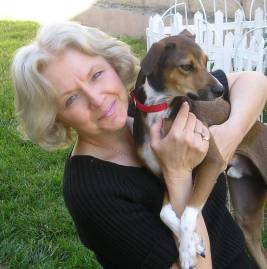 As for me, since I have always had a pet in my house, as a kid and as an adult, I never thought it odd to put a cat or dog in a story. My Ginger Caulfield private detective character has two dogs, Sherlock and Foxtrot. In reality, my husband and I got our two Italian Greyhounds, coincidentally named Sherlock and Foxtrot, from the Los Angeles pound. The two canines don’t solve mysteries in Gin Caulfield novels… yet. Though you never know. But I will tell you one thing… no dead dogs will EVER turn up in my stories.
 The three books in my Christmas series are full of animals even though Santa doesn’t consider them pets. After all, Bearnard, the Polar bear from Bearnard’s Christmas, works in the castle and even helps solve a mystery in the third book, Every Castle Needs a Dragon, coming out at Thanksgiving. Even the dragon, Orville by name, plays a rather large part in the story. (He reads as well as talks!)
But at the North Pole many things are just a tad different from anywhere else. One of our cats, Sylvester, actually makes a guest appearance at the North Pole in Bearnard’s Christmas. Angel, Sylvester, Winston and Cookie also drop into the story.


 My spy novels reference Sukoshi, the Beagle I had as a kid and up until I was working as a private detective at the age of 21. She is mentioned because the books are loosely based on my dad’s career in the Air Force and Sukoshi went to France with us when my father was stationed there. When we were visiting West Berlin, she had a very long leash that allowed her to wander under the barricade into the no-man’s land that separated West and East Berlin, so she actually got closer to the commie-side than I did.
CAVERNS is crawling with animals, mostly rats because the little dears are carving out caverns under the high-rises in Chicago. The story was actually based on something I heard from a co-worker who read about a 105 pound rat being found along the wharf area while she was living in New York City. Her story and the fact I had a case in Chicago while being a P.I. brought those two pieces together.
Most recently, I finished my latest book called SECOND CHANCE which has a rather “coincidental” tie-in to the subject of pets. Chance McCoy just got the opportunity of a lifetime. That’s the title page blurb.
Chance McCoy is a private detective killed during a routine case, but he is given a second chance to make good. But with his track record as a P.I., he just might blow this chance, too. That’s the book summary. So far, no pets… but…
All through the book, Chance views people he encounters as some kind of pooch. Droopy Bloodhound eyes on one guy. A teenage girl’s bodyguards are viewed as Bulldogs. Another set of hired muscle are called Rottweilers. Chance even enlists the services of a cadaver dog named Maurice to see if a body is buried in someone’s backyard.
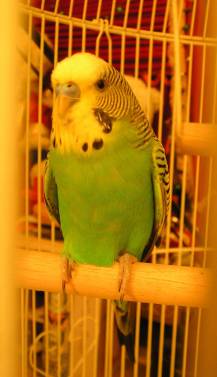 It really wasn’t a coincidence on my part to make these comparisons because, you see, I dedicated the book to Freddy J. Feathers, our beloved parakeet who recently passed away. I found Fred wandering in the backyard about six years ago and he got a “second chance” with us. That fact fit perfectly with this particular book. And the short piece at the end of the book ties my love of pets up with a big ribbon. (You’ll have to read that part for yourself.)
But pets, or members of the family as we call them in our house, have been a large part of my life and they seem to have played a big part in my writing as well. I guess we do leave bits of our heart in everything we write. So if you have room in your heart and your house, adopt a pet or get one from a reputable kennel. It’s one of the kindest things you can do for a furry or feathery friend in need.


 Rosemary wrote her first book when she was ten years old – for her little brother. She also illustrated it herself. It was later rejected by Random House! She has been writing ever since.




 If you are a follower of our Writers in Residence blog, you may have noted by now my fellow writers possess a wealth of knowledge! I’m always learning from them, especially when it comes to where to, how to, and when to.








 A former private detective and once a reporter for a small weekly newspaper, Gayle Bartos-Pool (G.B. Pool) writes the Johnny Casino Casebook Series and the Gin Caulfield P.I. Mysteries. She also wrote the SPYGAME Trilogy: The Odd Man, Dry Bones, and Star Power; Caverns, Eddie Buick’s Last Case, The Santa Claus Singer, Bearnard’s Christmas and The Santa Claus Machine. She teaches writing classes: “The Anatomy of a Short Story” (which is also in workbook form), “How to Write Convincing Dialogue” and “How to Write a Killer Opening.” Website:
 “Johnny worked for me several years until he had enough P.I. hours under his belt to go out on his own. I hated to see him go, but I knew he worked better alone. Most of the time I do my work solo like the case at the racetrack in Hedge Bet. I should amend that statement because I got my husband, Fred, to do some work for me. His trip to Mexico to bring back a witness led to a few choice words from him, mostly unprintable. But the guy’s a natural P.I.

 or at least I thought it was his real name, until another story in the Johnny Casino Casebook series uncovered something that even Johnny didn’t know. It changed everything for him. It’s in The Johnny Casino Casebook 2 – Looking for Johnny Nobody. That’s when I started seeing a pattern.”





 The Writers in Residence
You must be logged in to post a comment.